
Audio Control4.0.0.0 - Download
You'll be able to download in few seconds.
Publisher Description
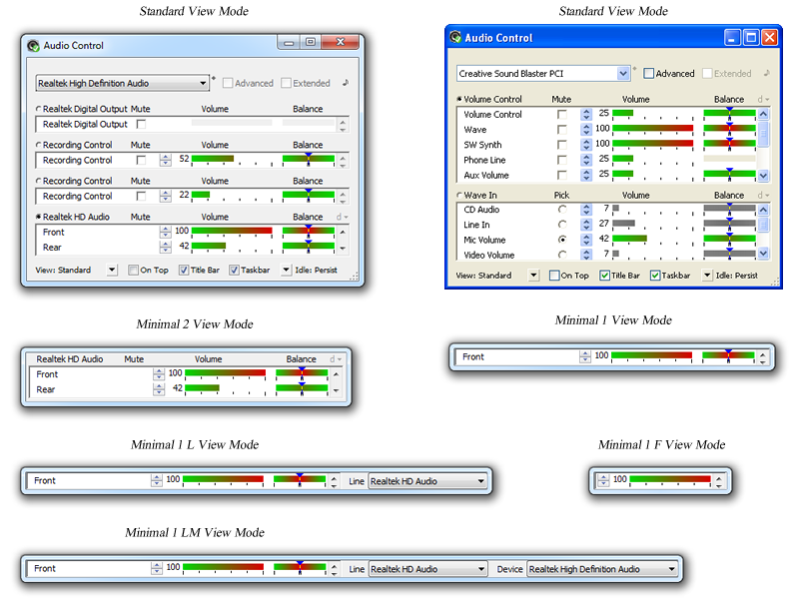
Audio Control is an audio mixer software utility for visualization and control of the computer audio volume, and is an improved substitution for the standard Windows Volume control. Audio Control inspects the host system for audio devices and displays them, and their audio controls, in a manner that is convenient to view and operate. Ergonomic and functional, Audio Control is designed to allow all kinds of customizations to save space on the work area of the screen and on the taskbar, and at the same time assisting the user to operate the sound devices on the system in the easiest and most efficient way possible. Audio Control is particularly useful for its improved precision, ease of access interface and idling features.
Audio Control can be used for FREE with an ad-driven or qualifying software license, or with a paid license.
About Audio Control
This program is available in English. It was last updated on 29 September, 2026. Audio Control is compatible with the following operating systems: Windows, Windows-mobile.
The company that develops Audio Control is MBBSoftware. The latest version released by its developer is 4.0.0.0.
The download we have available for Audio Control has a file size of 11.5 MB. Just click the green Download button above to start the downloading process. The program is listed on our website since 2016-02-02 and was downloaded 0 times. We have already checked if the download link is safe, however for your own protection we recommend that you scan the downloaded software with your antivirus. Your antivirus may detect the Audio Control as malware if the download link is broken.
How to install Audio Control on your Windows device:
- Click on the Download button on our website. This will start the download from the website of the developer.
- Once the Audio Control is downloaded click on it to start the setup process (assuming you are on a desktop computer).
- When the installation is finished you should be able to see and run the program.
Program Details
System requirements
Download information
Pricing
Version History
version 4.0.0.0
posted on 2016-02-02
Dear user of Audio Control, the new Audio Control, Edition 2016 (4.0.0.0) is now available for download. It includes number of improvements and bug fixes, among them:\r\n\r\n
- User interface fixes, including on the context menu.\r\n\r\n
- Windows installer/uninstaller improvements.\r\n\r\n
- A missed fix for ACServer version 4.243.103.3232.\r\n\r\n
- The new "Agile" operation mode, which allows working with the windows behind Audio Control when it is On Top.\r\n\r\n
- Hot key launching, with various additional features such as dynamic opening position and auto-exit.\r\n\r\n
- New accessibility and fast switching between audio devices and lines methods in the minimal view modes.\r\n\r\n
- Simplified and improved idling features.\r\n\r\n
- Visual improvements for audio devices and lines with too large or matching names.\r\n\r\n
- Number of other improvements.\r\n\r\n
- Bug fixes.\r\n\r\n
Note that re-activation may be required after upgrading to Audio Control 2016. We have also applied a fix about this and in future re-activation after upgrade will not be necessary.\r\n\r\n
Remember that using Audio Control could save, on average, 10 hours a year to computer users who change the audio volume of their computers a few times per day.
version 4.234
posted on 2007-09-17
Disclaimer
External Download
We do not host Audio Control on our servers. We did not scan it for viruses, adware, spyware or other type of malware. This app is hosted by the software publisher and passed their terms and conditions to be listed there. We recommend caution when installing it.
The external download link for Audio Control is provided to you by apps112.com without any warranties, representations or guarantees of any kind, so access it at your own risk.
If you have questions regarding this particular app contact the publisher directly. For questions about the functionalities of apps112.com contact us.
